
CovaNet Flow
A patch panel for live video, running in your browser.
Route SRT and RTMP feeds to any platform, partner or recorder with one click, on servers in Europe looked after by people who do live broadcast for a living.
Demo panel - nothing here is live
Studio A PGM is on air to the partner and the archive.
| Sources | RTMPYouTube MainArmed | RTMPTwitchOff | RTMPLinkedIn LiveOff | SRT listenerPartner FeedReceiver connected · 6.5 Mbps · loss 0% | RecordingArchiveOn air | WatchWatch playerOff |
|---|---|---|---|---|---|---|
| Studio A PGMSRT · 1080p50 | ||||||
| Studio B PGMSRT · 1080p50 | ||||||
| Remote Cam 1RTMP · 1080p25 | ||||||
| Remote Cam 2RTMP · 1080p25 |
Click a crossing to arm it, then Go Live. Click another source in a live column and press TAKE. Fold a group with its arrow.
How it works
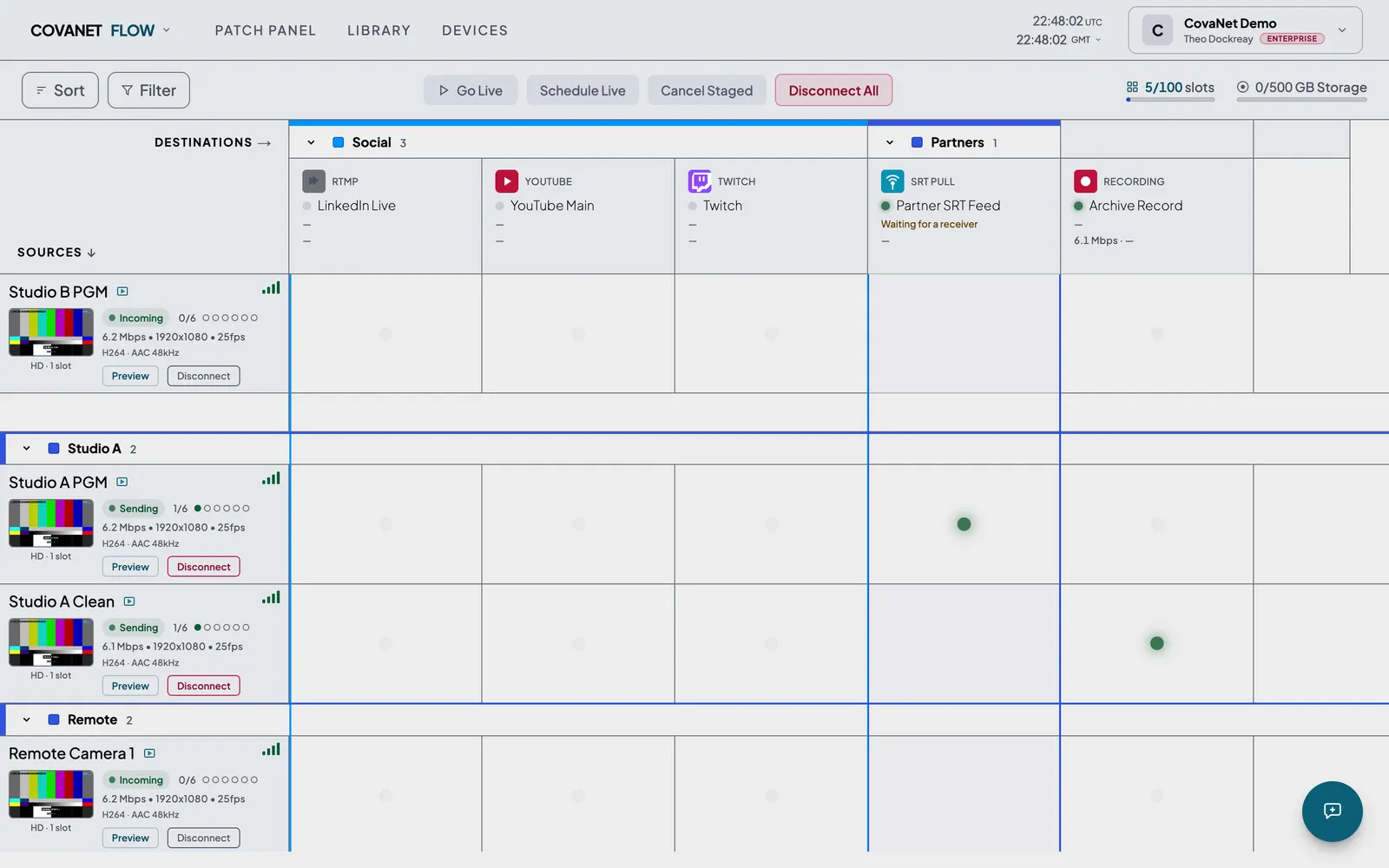
Sources down the side, destinations across the top.
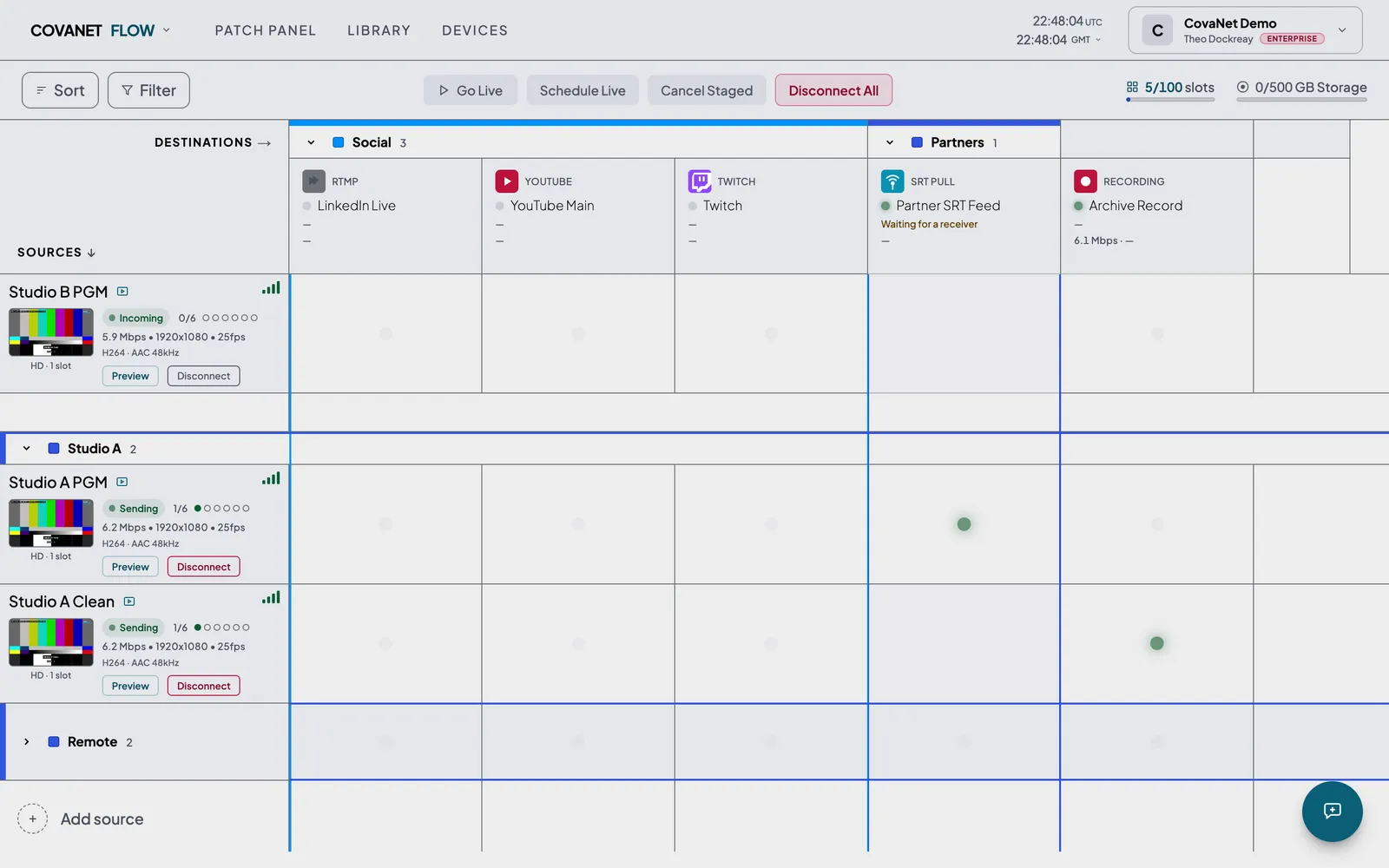
If you have stood in front of a broadcast patch bay, you already know how to use Flow. Every feed coming in is a row, every place it needs to go is a column, and clicking the square where they cross makes the connection. The square tells you what is happening on it - waiting, live, or stopped with the reason - so the state of the whole show sits on one screen rather than across encoder menus and a spreadsheet of stream keys.
- 1
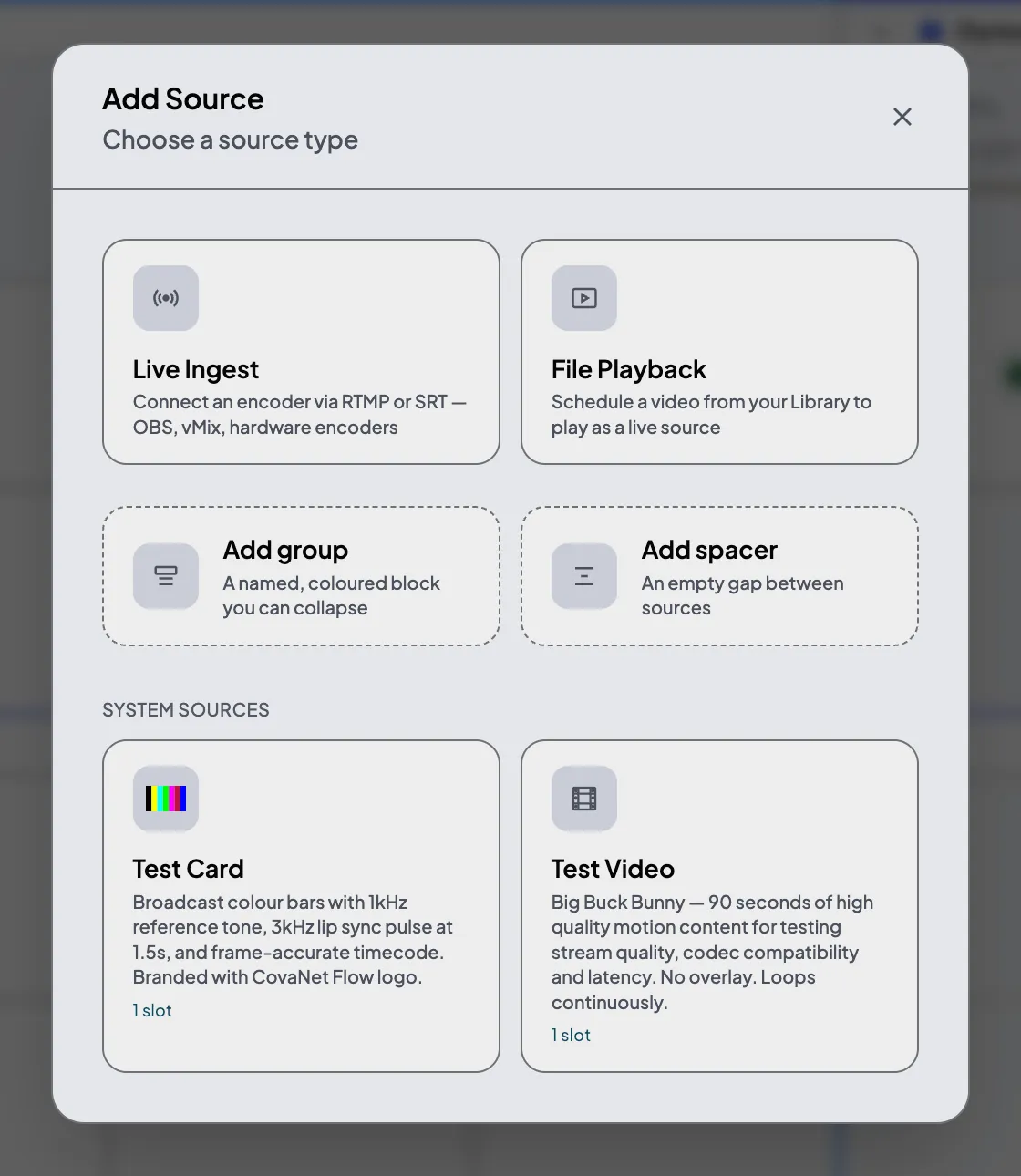
Add a source. Point your encoder at the address Flow gives you, over SRT or RTMP.
- 2
Add a destination. A platform, a partner's SRT address, or a recording.
- 3
Click the crossing and Go Live.
Sources
Getting the signal in.
SRT is there for contribution over connections you would not trust on their own, RTMP for anything that only speaks RTMP, and every source gets its own address and key the moment you create it. Give a source a main and a backup encoder and Flow switches to the backup if the main stops, in about eight seconds, and marks the source ON BACKUP so you can see it has happened. You can also upload a file and schedule it to play out at a set time, for replays, holding loops and anything pre-recorded.
c. 8 s
from main to backup encoder.
Destinations
Sending it wherever it needs to go.
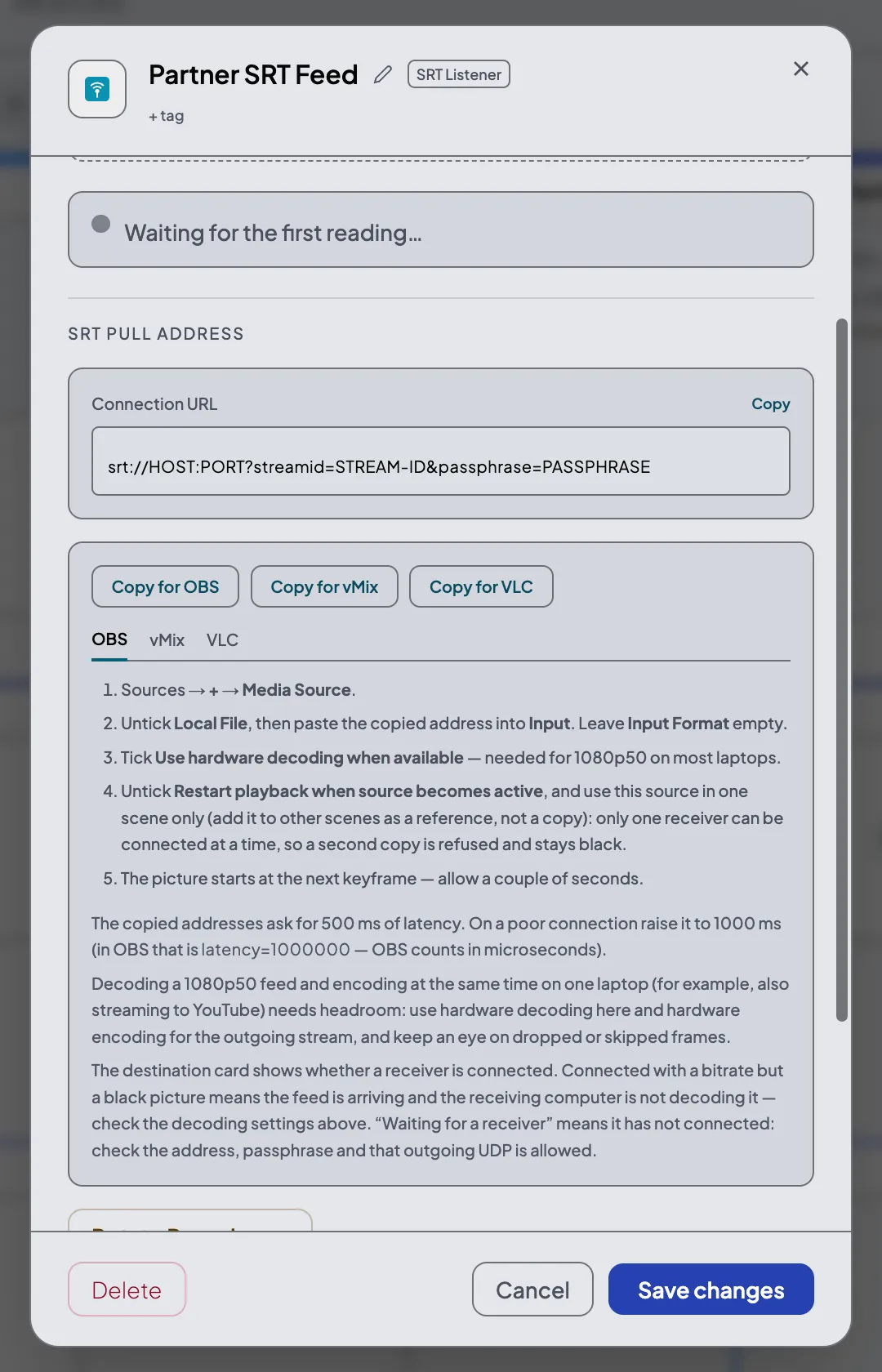
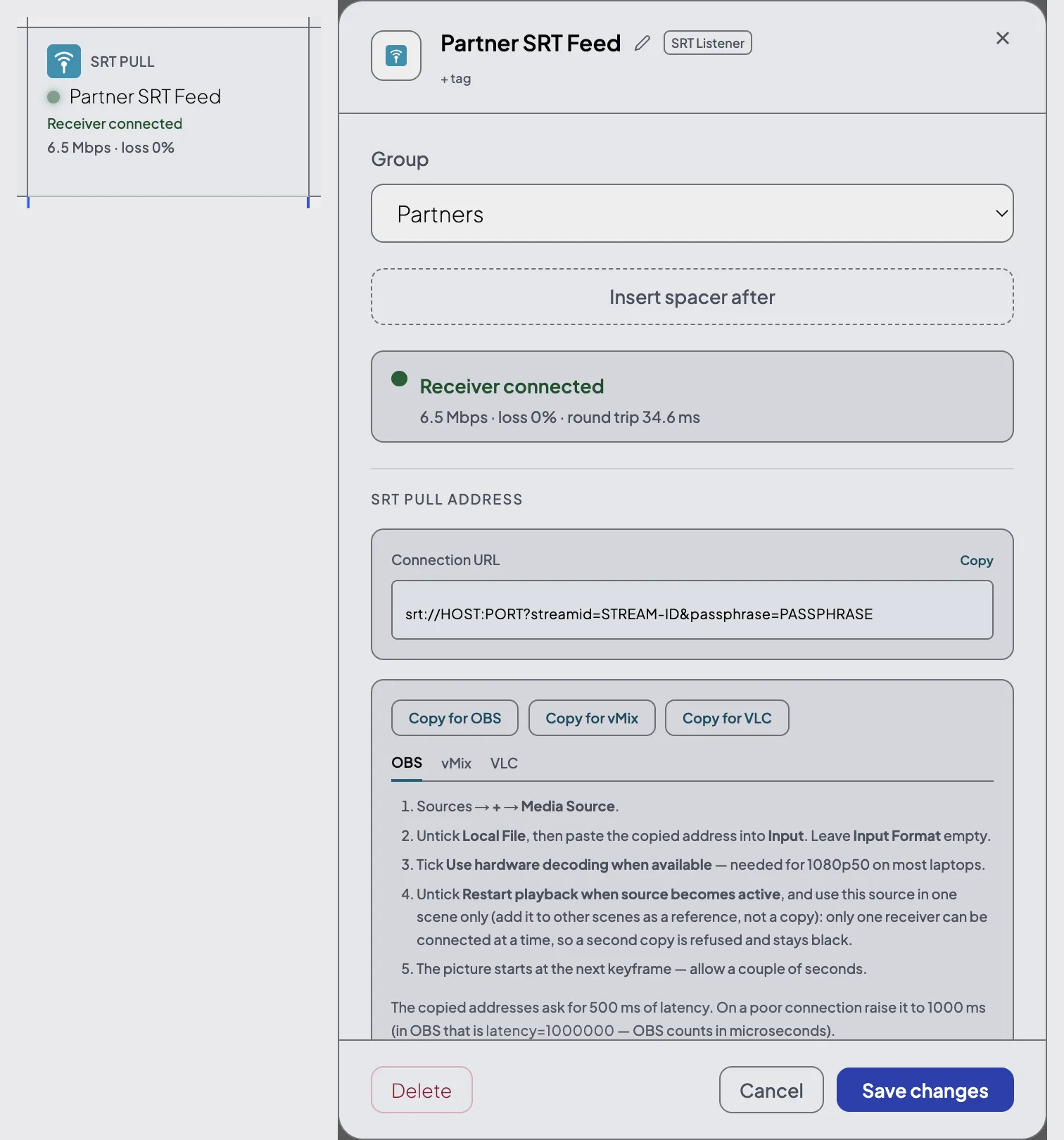
Platforms take your feed over RTMP, and partners take it over SRT, either with Flow calling them or with Flow listening and them calling in. A listener gives the receiver a ready-made address with buttons that copy it in the form OBS, vMix or VLC expect, so nobody has to remember that OBS counts SRT latency in microseconds. The destination card then shows whether the receiver is connected, at what bitrate and with how much loss, or that they have the wrong passphrase, so the call at 18:59 starts with an answer rather than a question.
How to receive an SRT feed from Flow (PDF)6 outputs
per slot - every source can feed six destinations at once.
On air
Built for the hour you are on air.
Group sources and destinations by studio, client or platform, give each group a colour, and fold away the ones you are not using; a folded group still shows you if anything inside it is live. TAKE moves a destination from one source to another without stopping the output, usually within a couple of seconds and never longer than the source's keyframe interval, for when the backup truck becomes the main truck. Both sources need the same format. A master clock shows UTC with your local time underneath, so everyone on the call is counting down to the same thing.
TAKE
source to source, output stays up.
Reports
Knowing what actually happened.
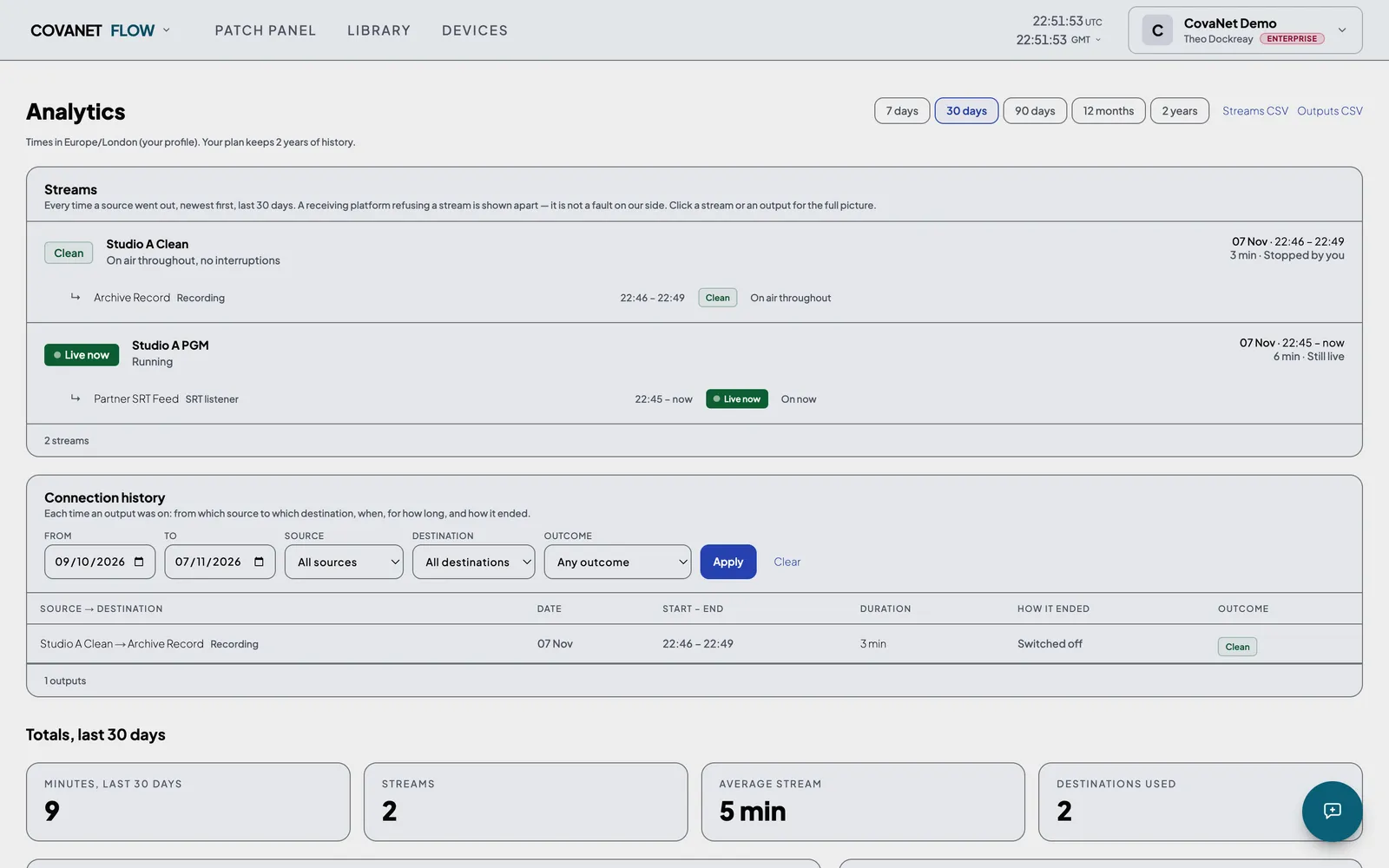
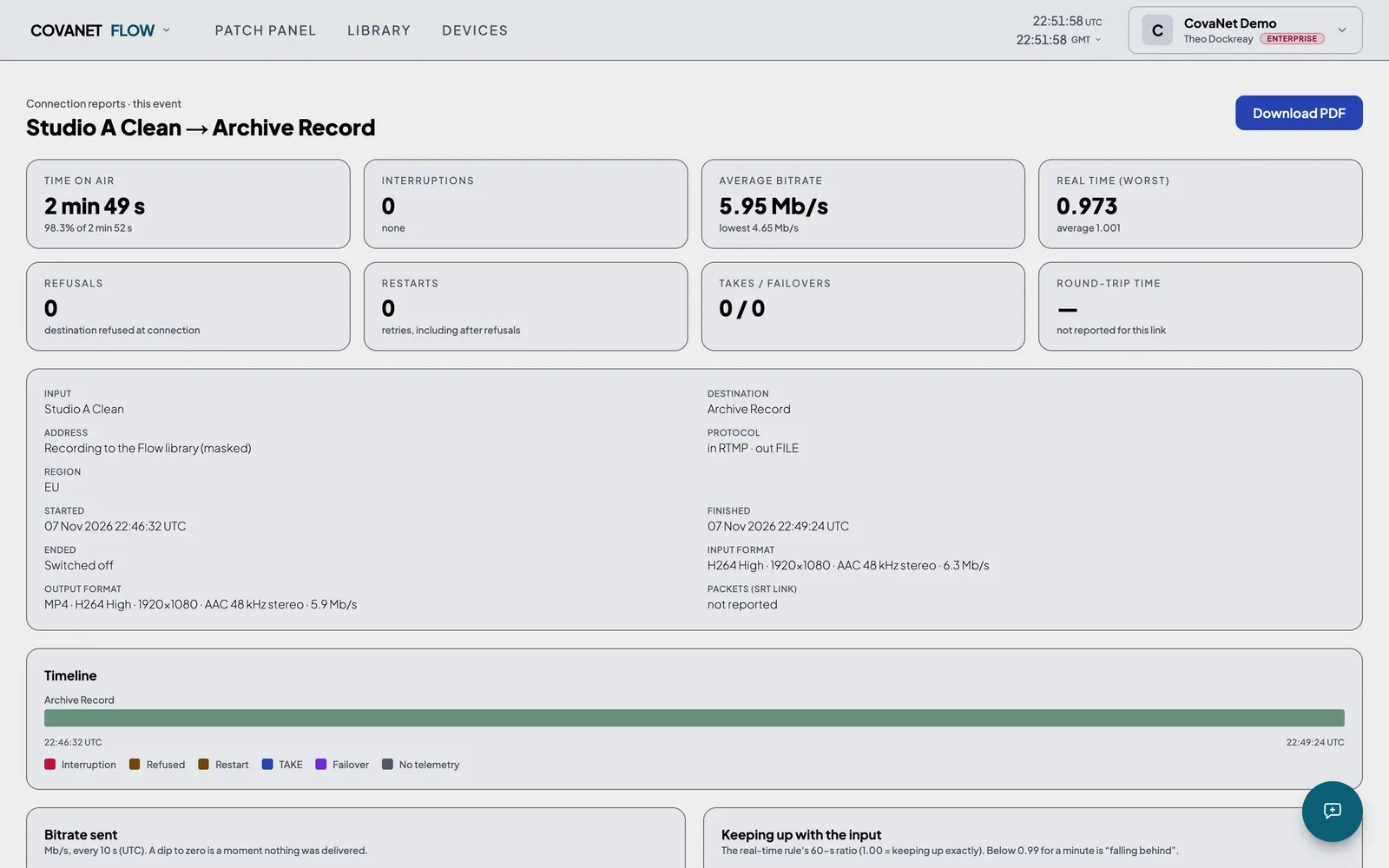
Every stream gets an outcome, good or bad, with what the input and each output were doing every ten seconds. Any run can be exported as a report with your logo beside ours, listing when it started, what it carried and every interruption our ten-second samples caught. It is the piece of paper that settles the conversation with the client on Tuesday.
Reliability
Looked after like broadcast kit.
Most of the work on Flow is the work you do not see. Specifically:
- 01On our live servers, outputs and SRT listeners carry on through a restart of our server software, with a gap of around half a second.
- 02Every morning a new server is built from scratch and a test feed is pushed through it, and changes to how video is handled are proven on a fresh server before they reach the live ones.
- 03Servers only install updates when nothing is on air, one at a time, and are tested again before they take traffic.
- 04A failed payment never stops a live output, and anything over your allowance is settled afterwards. The only limit that ends a stream on its own is the longest-stream length you chose, or a feed far above the bitrate for its resolution.
- 05CovaNet is a UK company, and Flow runs on servers in the EU.
c. 0.5 s
gap through a server software restart.
Pricing
Pay for what you use, and see the number before you buy.
There are no fixed plans to squeeze into. You choose how many slots you need, how long your longest stream runs, how much storage and how many people, and the price is the sum of those parts, paid monthly or yearly.
- A 1080p source received in the EU or the US takes one slot.
- A 1080p source received in Asia takes four slots.
- A 2K source takes two slots.
- A 4K source takes four slots.
- Slot costs multiply: a 2K source in Asia takes eight slots, and 4K in Asia is contract only.
- Every slot includes 6 outputs, so each source can send to 6 destinations at once.
- Each slot includes a monthly pool of output-hours (one output on air for one hour is one output-hour, counted twice for a 2K source and four times for 4K); the longer your longest stream, the bigger the pool.
- Output-hours beyond the pool are billed afterwards at £0.05 each in the EU and US and £0.15 in Asia, and a stream is never cut for billing.
Includes 1,500 output-hours a month (300 per slot).
50 GB of recording storage is always included. Extra storage comes in 500 GB blocks.
Your plan
£1,890/year
£157.50/month effective, instead of£189 paid monthly
- Slots
- 5 slots
- Outputs per source
- 6
- Longest stream
- 12 hours
- Output-hours a month
- 1,500
- Storage
- 50 GB + 1 TB
- Seats
- 4
Annual plans are paid yearly and fixed for the 12-month term.
Compare the presets
The same three presets as a table, if you would rather not use the sliders.
| Solo | StudioMost popular | Broadcast | |
|---|---|---|---|
| Slots | 1 | 5 | 20 |
| Outputs per source | 6 | 6 | 6 |
| Longest stream | 6 hours | 12 hours | 24 hours |
| Included output-hours a month | 150 | 1,500 | 9,600 |
| Storage | 50 GB | 50 GB + 1 TB | 50 GB + 2 TB |
| Seats | 2 | 4 | 8 |
| Monthly | £19/mo | £189/mo | £793/mo |
| Annual | £190/yr | £1,890/yr | £7,930/yr |
| Get started | Get started | Get started |
Enterprise
Need more than 50 slots?
Get in touch to discuss contract pricing, dedicated infrastructure and custom SLAs.
Questions
Common questions
What is a virtual patch panel?
A patch panel is the routing tool at the heart of a broadcast facility: sources in down the side, destinations across the top, and a connection wherever they cross. Flow puts that grid in your browser. Click a crossing and your source is routed to that destination. No cables, no hardware, no engineers on site.
Do I need special hardware?
No. If your encoder can send RTMP or SRT, and nearly all of them can, including OBS Studio, vMix and Wirecast, you are ready to use Flow. Point your encoder at the address Flow gives you and start routing.
What platforms can I stream to?
Any platform that accepts an RTMP or SRT stream, by giving Flow its ingest address. YouTube and Twitch can also be linked to your account, so Flow sets the destination up for you. One-click links for Facebook, LinkedIn, X and Kick are coming soon. You can also send to a partner over SRT, record, re-stream into another Flow source, or feed a CovaNet Watch player.
Is the Free account really free?
Yes. Create a free account at flow.covanet.co.uk to set up your sources and test cards in a few minutes; sending to destinations starts with Solo at £19 a month. No card is needed to sign up.
What is the difference between sources and destinations?
A source is a feed coming in: from your encoder, a camera, a contribution link or a file played out on a schedule. A destination is where it goes: a platform, a partner's SRT address, a recording or a Watch player. The patch panel connects one to the other.
Can I change my configuration at any time?
Yes. Increases - more slots, a longer longest stream, more storage or more seats - take effect immediately and you are billed the prorated difference. Reductions take effect at renewal: from your next billing month on monthly billing, or at the end of the 12-month term on annual billing, so you keep your current allowances until then.
What is the difference between RTMP and SRT?
RTMP is the protocol most encoders and platforms speak, and it works well on a steady connection. SRT was built for contribution over connections you cannot fully trust: it recovers lost packets and copes with jitter, and it can be encrypted. Flow takes both in, and sends both out.
Where is the infrastructure based?
Flow runs on servers in the EU, and CovaNet is a UK company. Regions in the US and Asia are coming soon.
Start on the free account, or talk to us.
Create a free account at flow.covanet.co.uk to set up your sources and test cards in a few minutes; sending to destinations starts with Solo at £19 a month. For more than 50 sources, managed distribution or anything unusual, please get in touch.